
Exploratory Testing in 2026: Best Practices, Benefits, and Examples

Note: this article was updated in February 2026.
Exploratory testing continues to be one of the most effective QA strategies in modern software development. Unlike scripted testing, it blends real-time learning, design, and execution — helping testers uncover high-impact issues that might otherwise slip through.
This guide will provide practical insights, modern techniques, and proven approaches to making exploratory testing more structured, efficient, and valuable for your QA process.
What is Exploratory Testing?
Exploratory testing is a dynamic approach to software quality that combines simultaneous learning, test design, and execution. Instead of relying on predefined test cases, testers actively investigate the application, adjusting their actions as they uncover new behaviors, risks, or inconsistencies.
This method leverages tester expertise, critical thinking, and domain knowledge, making it both flexible and structured. Far from being ad hoc, exploratory testing is goal-driven and results-oriented, delivering valuable insights into product quality and user experience.
Types of Exploratory Testing
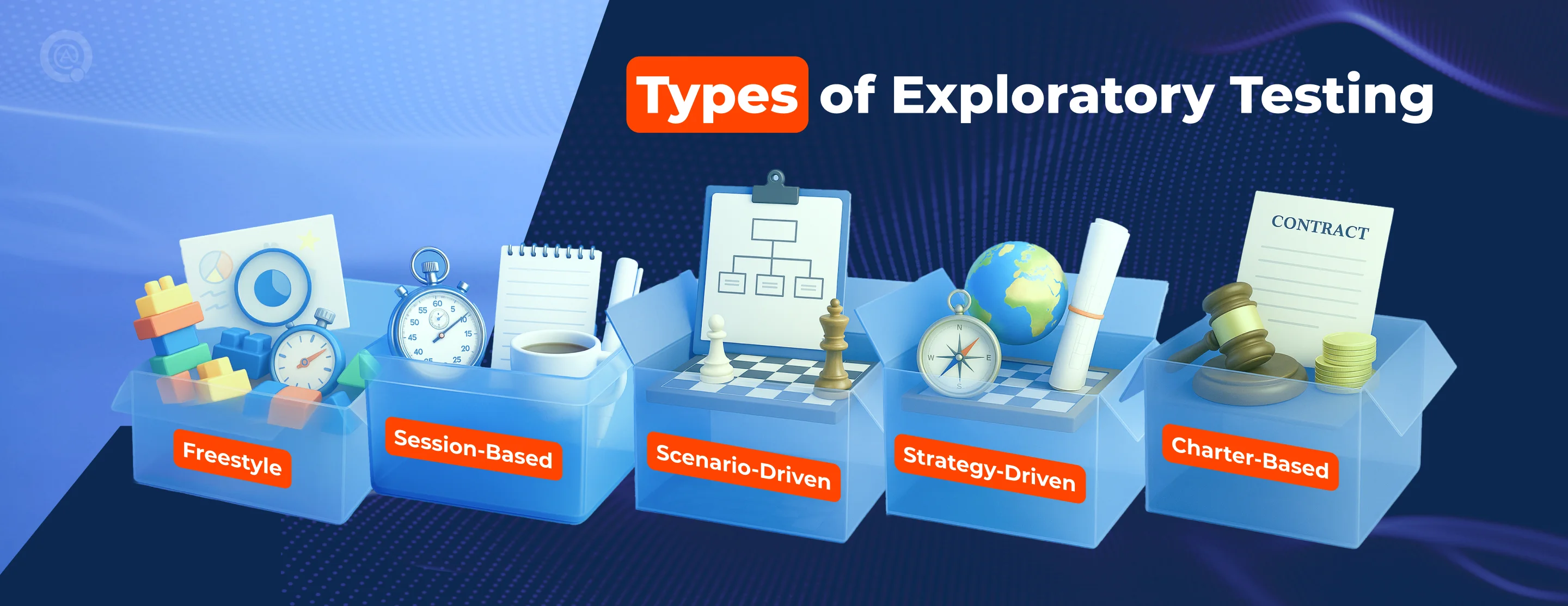
Exploratory testing is not a one-size-fits-all approach. Depending on the project stage, risks, and goals, testers can apply different exploration styles. Below are the most common types — each serving a specific purpose in modern QA practice.
1. Freestyle
This is a completely open-ended approach, perfect for the first encounter with a product. Testers explore without restrictions, making it useful for smoke checks, quick assessments, and uncovering obvious defects.
2. Session-Based
Testing is structured into time-boxed sessions (usually 45–90 minutes) with clear objectives and documentation. It provides accountability while preserving creativity, making it a reliable method for Agile teams.
3. Scenario-Driven
Focuses on real-world user journeys. Testers simulate end-to-end workflows (e.g., signing up, making a purchase, or processing a refund) to identify issues in how features connect and flow together.
4. Strategy-Driven
Uses formal test techniques — boundary value analysis, equivalence partitioning, or risk-based targeting — to guide exploration. This type is valuable for complex logic, data validation, and critical edge cases.
5. Charter-Based
Each session is guided by a mission statement (a “charter”), such as: “Explore the checkout process with multiple currencies to identify payment failures.” It gives direction without overrestricting the tester’s creativity.
When Should Teams Use Exploratory Testing?
Not every project requires exploratory testing at the same intensity, but there are specific situations where it becomes a real game-changer. Over the years, our QA teams have seen the most substantial impact of this approach when flexibility, speed, and human intuition are critical.
- Early Development Stages: identify critical issues before requirements solidify.
- Tight Deadlines: provide quick feedback when there’s no time for full test planning.
- Complex Systems: navigate multi-layered workflows where scripted coverage is insufficient.
- User Experience Checks: reveal usability flaws that automated or scripted tests rarely catch.
These examples show that exploratory testing is most impactful when speed and adaptability matter most. To make it effective, teams apply exploratory testing techniques that combine structure with creativity.

Modern Exploratory Testing Techniques
→ Mind Mapping
Transforms ideas into a visual structure, making exploration paths easier to follow. It helps testers see what’s already covered, highlight gaps, and generate new scenarios — beneficial for brainstorming edge cases.
→ Pair Testing
Brings two people together in one session, often from different roles or expertise levels. This collaboration accelerates defect discovery, uncovers diverse perspectives, and encourages knowledge sharing across the team.
→ Bug Taxonomies
It relies on predefined categories of common defects (UI, performance, security, etc.) to guide exploration. This keeps sessions systematic and ensures critical areas are not overlooked while still leaving space for unexpected findings.
→ AI Assistance
Leverages modern tools that suggest high-risk areas, analyze patterns, and automatically capture tester actions. While AI cannot replace human intuition, it makes exploration faster, better documented, and more focused.
AI in Exploratory Testing: Enhancing Human Insight
Artificial Intelligence (AI) is becoming an important assistant in exploratory testing, playing a growing role in AI testing by suggesting unusual scenarios, identifying high-risk areas, and automating documentation such as screenshots and bug reports.
It also adds value in visual and UX testing, detecting layout shifts and accessibility issues that might slip through manual review. Still, the direction and interpretation of findings remain with human testers, whose domain knowledge and creativity ensure meaningful results.
With AI now shaping QA practices, the next step is to see how exploratory testing connects with automation testing to build a stronger overall strategy.
Exploratory Testing vs. Automated Testing
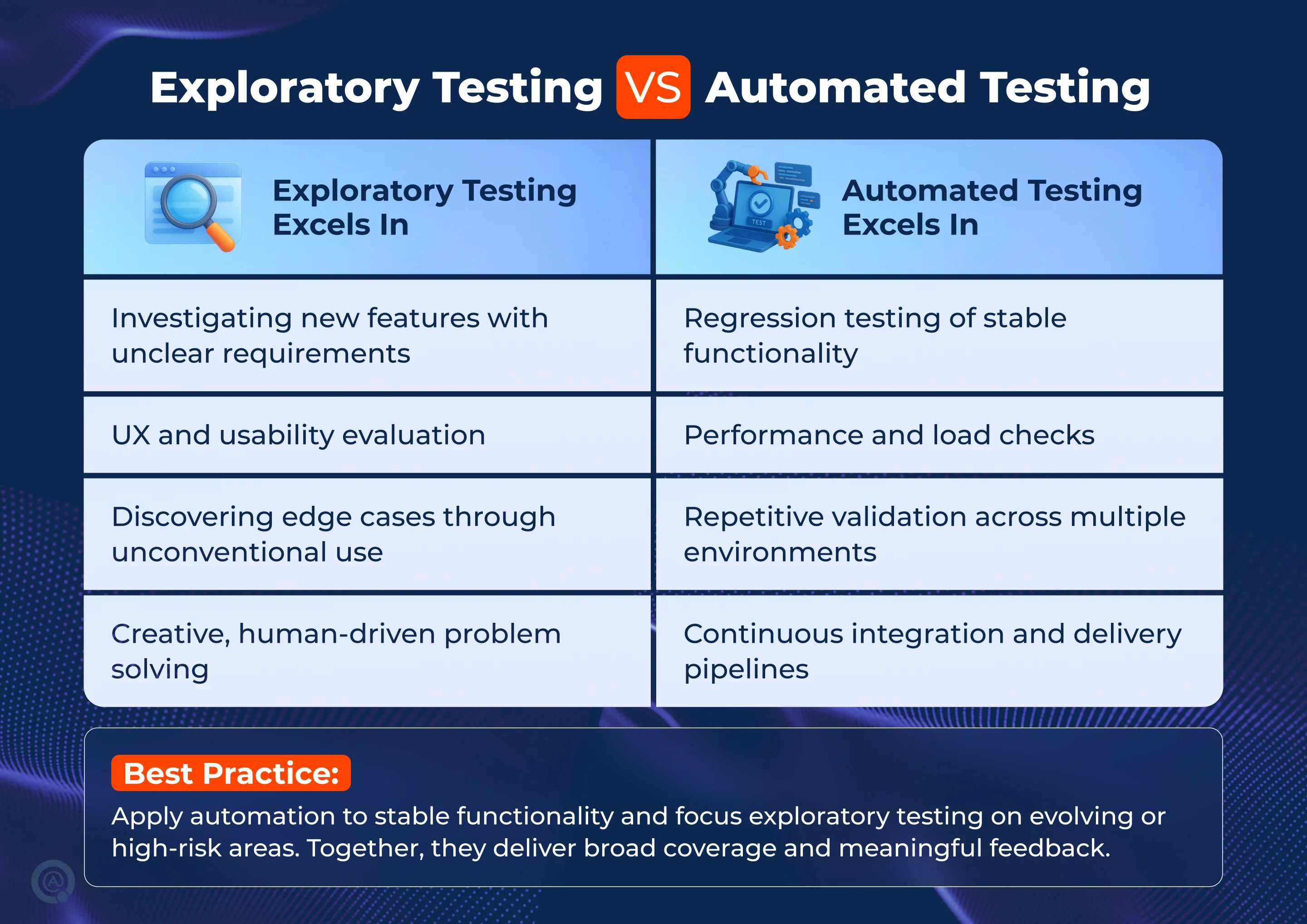
Exploratory testing delivers the best results when integrated with automation testing. Automation ensures speed and reliability, while exploratory testing adds adaptability and human insight. Together, they create a complementary approach that balances coverage and confidence in product quality, as shown below.
Tools Supporting Exploratory Testing
The right tools make exploratory testing easier to plan, execute, and document. Instead of replacing human creativity, they provide structure and traceability:
- Session Management Platforms
Tools like TestRail, Xray, and Testmo help organize charters, time-box sessions, and track outcomes. They bring accountability to otherwise free-form testing. - Screen Capture & Recording
Utilities such as SpiraCapture or JIRA Capture automatically document tester actions with screenshots or video, reducing the risk of missed details. - AI-Powered Platforms
Solutions like ACCELQ, Testim, and mabl suggest high-risk areas, highlight unusual patterns, and auto-generate reports to accelerate the process. - Collaboration Hubs
Azure Test Plans, Notion, and Confluence support team-wide visibility, shared notes, and real-time feedback loops.
↳ Together, these tools help testers keep the creative benefits of exploration while ensuring findings are clear, traceable, and actionable. By adding structure and visibility, the tools transform exploratory findings into results that directly contribute to business goals.
Business Value of Exploratory Testing
Applied in a structured way, the exploratory testing connects testing activities with business priorities, turning QA efforts into tangible organizational value. The most significant benefits are:
✔︎ Improved Defect Discovery
Studies show exploratory testing can uncover 25-40% more high-priority issues than scripted testing alone, particularly in UX and integration scenarios.
✔︎ Accelerated Feedback Loops
Time-boxed sessions deliver quick insights, allowing developers to correct issues faster and keep sprint velocity high.
✔︎ Extended Coverage
Exploration reaches beyond automation, identifying edge cases, usability flaws, and cross-module risks that scripts can’t cover.
✔︎ Reduced Costs
Catching issues earlier in the cycle lowers rework expenses, shortens release delays, and minimizes the chance of costly post-production fixes.
| Business takeaway: regular exploratory efforts prevent costly redesigns later, protecting ROI on both product development and customer acquisition.

Challenges and How to Overcome Them
While exploratory testing brings clear benefits, teams often face obstacles that limit its impact. Recognizing these challenges in advance — and applying targeted solutions — helps ensure exploratory practices remain effective and scalable.
Documentation Gaps
Problem: Free-form sessions often lack proper notes.
Solution: Adopt session-based templates and lightweight reporting tools to capture findings consistently.
Reproducibility Issues
Problem: Developers struggle to replicate defects without clear steps.
Solution: Use screen recorders and annotated screenshots to create instant evidence.
Skill Dependence
Problem: Effectiveness varies widely based on tester expertise.
Solution: Encourage pair testing, mentorship, and continuous training to balance experience levels.
Time Pressure
Problem: Without boundaries, exploration can expand endlessly.
Solution: Apply strict time-boxing and charters to keep sessions focused and productive.
Best Practices for Success
To unlock the full potential of exploratory testing, teams need a clear framework that keeps sessions structured and outcomes actionable. The following practices have proven most effective in real projects:
- Set Clear Objectives — Define what each session aims to achieve while leaving space for unexpected insights.
- Blend with Other Methods — Use exploratory alongside scripted and automated testing for maximum coverage.
- Document Systematically — Keep concise but structured notes, making findings reproducible and transparent.
- Encourage Team Collaboration — Use pair testing, group debriefs, and shared reporting to spread knowledge.
- Prioritize by Risk — Focus effort on business-critical features and areas with the highest probability of failure.
- Leverage Domain Expertise — Involve testers who deeply understand the product and user behavior for richer results.

Final Thoughts
Exploratory testing has evolved from a “nice-to-have” into a strategic necessity for modern QA. It empowers testers to think critically, respond to change, and uncover issues that automation or scripted testing alone cannot.
In 2026, the most effective QA strategies will not choose between exploratory and automated testing — they will integrate both, ensuring speed, coverage, and insight at every delivery stage.
If you’re looking to strengthen your testing process with expert exploratory sessions backed by proven QA practices, reach out to QATestLab. Our team is ready to help you uncover hidden risks, improve product quality, and accelerate your releases.

FAQ
- How is exploratory testing different from ad-hoc testing?
Exploratory testing is a structured process with clear goals and documentation, combining learning, test design, and execution. Ad-hoc testing is informal, unplanned, and lacks documentation. - Can exploratory testing be automated?
Exploratory testing relies on human creativity, but AI-powered tools can assist by suggesting test areas, recognizing patterns, and automating routine tasks. The core exploration remains human-driven. - What skills make exploratory testing effective?
Key skills include critical thinking, domain knowledge, creativity, and strong observation. Experience with the application and understanding user behavior improve results. - How do you measure exploratory testing success?
Success is measured by defects found per session, coverage of risk areas, quality of feedback, and insights for future testing. Session management tools help track progress. - When is exploratory testing not recommended?
It is less effective when strict regulatory rules require full documentation, when testing very stable features, or when testers lack domain expertise. - How long should exploratory testing sessions last?
Sessions typically last 45-90 minutes for focused exploration. Shorter sessions (30 minutes) suit small features, while longer sessions (up to 2 hours) fit complex scenarios. - What’s the role of AI in modern exploratory testing?
AI helps identify risk areas, suggests test scenarios, automates documentation, and predicts defect-prone zones, boosting testing efficiency while preserving human insight.
Learn more from QATestLab


Related Posts:
About Article Author
view more articles




Referring to your comment “And replace the tactical plan with setting a goal”. I think in exploratory testing we don’t have any particular goal then to testing but in Ad hoc based we do have a goal or aim to perform.
The real problem is that managlement does not have a firm grasp on what the output of exploratory testing will do. The comforting numbers that come out of scripted testing give them a effort measurement. Most test cases find a single issue. Once fixed running it again just increases the numbers but not the knowledge of reliability.
Exploratory testing is the left to the unmeasurable art of the tester. The numbers from exploratory testing shows more problems found per hour than scripted testing.
Scripted testing establishes a baseline to test from. It also teaches the tester how the app works quickly.Then exploratory testing takes over going into the undefined, gray areas of the app.
Large fan on this site, lots of your articles have truly helped me out. Looking forward to up-dates!